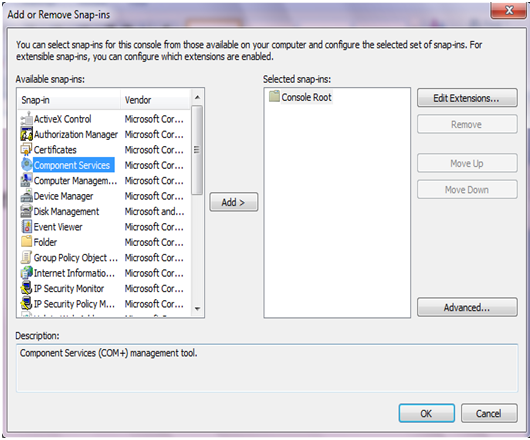
How to add Microsoft Excel Application

  1. Start
  2. Run
  3. mmc -32  or DCOMCNFG -32 or dcomcnfg
  4. File
  5. Add Remove Snap-in
  6. Component Services
  7. Add
  8. OK
  9. Console Root
  10. Component Services
  11. Computers
  12. My Computer
  13. DCOM Config
  14. Microsoft Excel Application

 Step to add:


Right click and select Properties->Select Identity Tab->Select This user and add the Administrator
 accout and password


 Select Security Tab, Under "Launch and Activation Permissions", Choose "Customize", Click "Edit" button, Add the everyone account and add all the Permissions 


 Do the same thing in "Access Permissions" and "Configuration Permissions". 

Refer : http://journeytodotnetauthority.blogspot.in/2012/03/how-to-add-microsoft-excel-application.html

Comments

Popular posts from this blog

SSL Certificate for IIS 8 in win 2012

                                                                       SSL How to create / import and configure self signed ssl certificate for IIS 8 in win 2012 Refer : http://www.youtube.com/watch?v=BYwOMuBDhPU http://www.entrust.net/knowledge-base/technote.cfm?tn=8713 1. Go to IIS 2. Select servername(TOP) 3. Middle area iis---->server certificate-->double click-->right side chosse & click created self certificate-->Specify a friendly name---> choose certificate type & click OK 4. Select site and right side BINDINGS--->Add-->Choose type https--->enter hostname and choose SSL cerificate---> ...

IIS 7 Tip # 5 Run a command when Rapid Fail Protection is triggered

Rapid-Fail Protection disables application pools if they crash multiple times within in a specified time period. This prevents the failing application pool from getting into a continuous loop of crashing and restarting. This protects other application pools running on the server as repeated failures can consume lot of system resources. When rapid-fail protection kicks in it stops the application pool that is repeatedly crashing and your clients will start getting a 503 – Service Unavailable error. An administrator will have to manually enable the application pool again. You also have to option to configure an executable to run when ever rapid-fail protection is triggered. For example below I have configured the application pool to restart the IIS service using iisreset.exe … the /rebootonerror will reboot the whole server if iisreset.exe for some reason fails to restart the services. Refer http://blogs.msdn.com/b/vijaysk/archive/2009/03/13/iis-7-tip-5-run-a-command-when-rapid-f...